anaconda
anaconda
env
创建虚拟环境
conda create -n env_name python=3.8
查看虚拟环境
conda env list进入\激活虚拟环境
conda activate env_name退出虚拟环境
conda activate删除虚拟环境
conda remove --name env_name --all导出环境
#获得环境中的所有配置
conda env export --name myenv > myenv.yml
#重新还原环境
conda env create -f  myenv.yml
pkg
查看当前虚拟环境的包/库
conda list查询是否安装哪个包
详细查找
conda list pkgname
模糊查找
conda list pkgname*
安装包
conda install package_name
conda install numpy=0.20.3
查询包的版本 (不是本地的,是这个包网上有几个版本)
conda search package_name卸载包
conda uninstall package_name
清理anaconda缓存
conda clean -p      # 删除没有用的包 --packages
conda clean -t      # 删除tar打包 --tarballs
conda clean -y -all # 删除所有的安装包及cache(索引缓存、锁定文件、未使用过的包和tar包)
python版本管理
conda install python=3.5 #将版本变更到指定版本
python --version         #查看python版本
conda install vs pip install
conda只能在conda管理的环境中使用,例如比如conda所创建的虚环境中使用。pip可以在任何环境中使用,在conda创建的环境 中使用pip命令,需要先安装pip(conda install pip ),然后可以 环境A 中使用pip 。conda 安装的包,pip可以卸载,但不能卸载依赖包,pip安装的包,只能用pip卸载。
如何判断conda中某个包是通过conda还是pip安装的?
执行 conda list ,用pip安装的包显示的build项目为pypi。镜像
添加清华源channel
conda config --add channels https://mirrors.tuna.tsinghua.edu.cn/anaconda/pkgs/free/
删除
conda config --remove channels https://mirrors.tuna.tsinghua.edu.cn/anaconda/pkgs/free/
展示所有
conda config --show channels
设置下载时候显示channel
conda config --set show_channel_urls yes查看现在的channel状态和优先级
conda config --get channels

展示所有的镜像channel
conda config --show channels #越上面优先级越高

添加conda-forge channel
conda-forge channel最新添加的优先级越高
jupyter
方法一 为 conda 环境创建特殊内核
conda create -n my-conda-env    # creates new virtual env
conda activate my-conda-env     # activate environment in terminal
conda install ipykernel      # install Python kernel in new conda env
ipython kernel install --user --name=环境名 # configure Jupyter to use Python kernel


方法一删除虚拟环境内核
jupyter kernelspec remove 环境名 # 删除虚拟环境的 kernel 内核方法二 使用 nb_conda_kernels 添加所有环境
第一种方法其实也挺不错的。有个缺点是,你新建一个环境,就要重复操作一次。
而这个方法就是一键添加所有 conda 环境,但需要在新环境里面安装 ipykernel
conda activate my-conda-env
conda install ipykernel
conda deactivate

conda activate base      # could be also some other environment
conda install nb_conda_kernels
jupyter notebook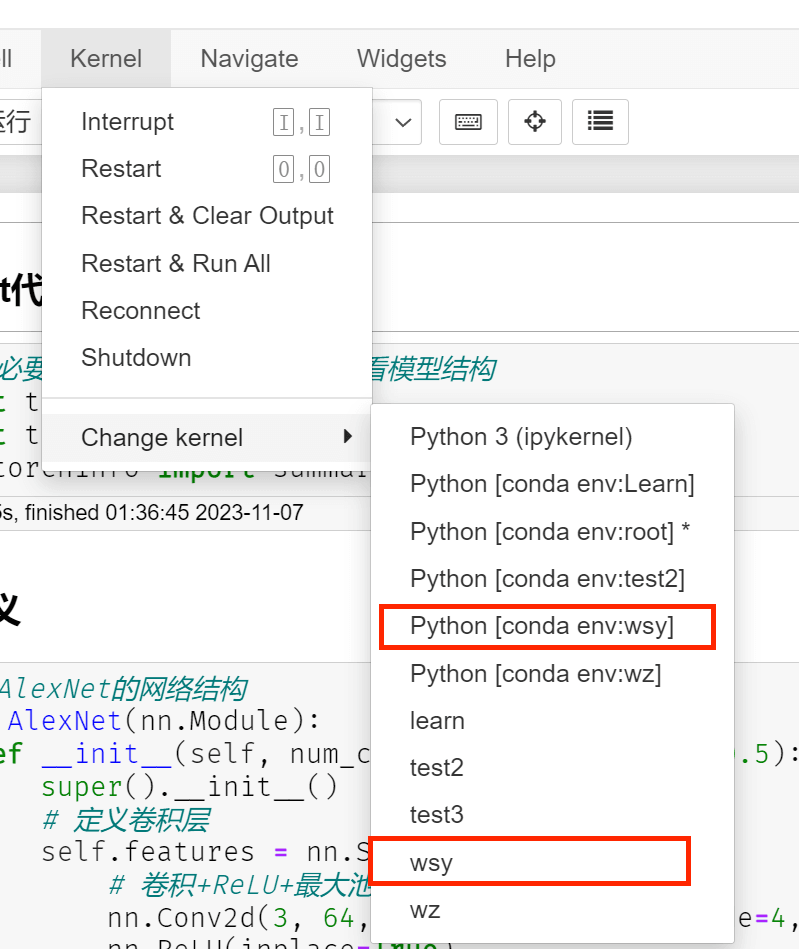
第一个框是方法二
第二个框是方法一
11
anaconda
http://example.com/post/a5f86784.html